Google+
Showing posts with label online facilitation. Show all posts

Tuesday, June 06, 2017

Join in and experiment with us - First KM4Dev Online Open Space


As is often the case, the recent face to face gatherings in Seattle and Geneva have rippled onto the KM4Dev list, bringing a lot of energy and discussions.

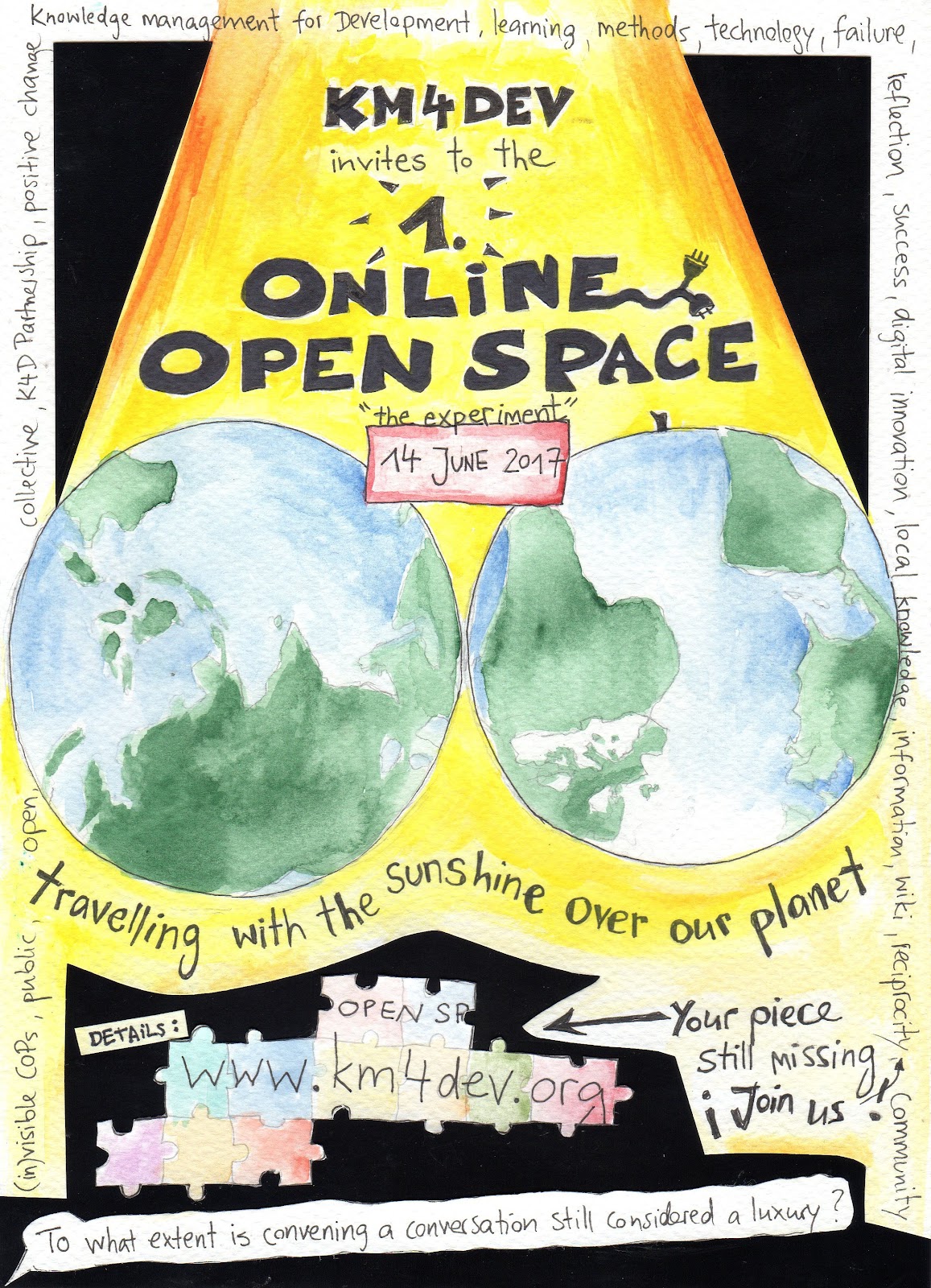
One conversation in particular generated a lot of interest, on the value and constraints of bringing people together to share and learn from each other. Between the need to reduce travel related meetings to limit our carbon footprint, decreasing budgets to organize and attend conferences and events, and a general ‘business’ that doesn’t always allow us to engage, “to what extent is convening a conversation still considered a luxury?

One of the (many) ideas that emerged was to try and organize a KM4Dev online open space - so we offered to facilitate the process to make it happen.

KM4Dev_OOS2017.jpg

So you are invited to join us and experiment in the first KM4Dev Online Open Space on 14th June, from 02:00 London time (01:00 GMT) to 19:30 London time (18:30 GMT). We will be using Adobe Connect for the meetings and Google docs for the Market Place and for notes.

Suggested process

We’re proposing to run approximately two-hour long sessions, with a 30 min break between them. In total, we have up to 8 sessions scheduled, so all timezones should be well covered.
The suggested outline for each session is as below - but of course these are first thoughts and we welcome comments:
  • Hellos, including people logging in, 15m 
  • Introduction to Open Space - principles, how we’ll work, 10m 
  • Marketplace - looking at any suggestions already collected during the registration, inviting new topics, and then the process of agreeing which topics will be led by whom, followed by people selecting which one to join and allocating people to the different online breakout rooms, 30m
  • Conversations of about 30 - 45m 
  • Feedback, about 15m
  • Goodbyes, 5m

Who else is coming?

Some 15 people have already registered, and we’re already covering the whole globe, from Manila in the Philippines to Seattle in the US.


But as you can see in the illustration above by fellow km4dever Tina Hetzel, your piece is still missing. So why not joining us? You can register here and join the list with the other volunteers that have come forward to make this happening.

Come experiment with us, travelling with the sunshine over our planet!

Friday, June 19, 2015

How to encourage engagement in virtual meetings?

Virtual meetings are here to stay. Increasingly, organizations in our sectors are promoting the use of online web conferencing and web gathering tools to organize learning events, team and project meetings, information sharing sessions, etc. Budget cuts, the increasing availability of technology solution, and the way we are more and more working in decentralized, virtual teams, all ask for online meetings that are well designed, facilitated, and engaging.
webinar by Jules on Flickr

So how to make this happen? What are the options and techniques to make a virtual meeting more productive, participatory and engaging?

To explore this questions, yesterday I joined a webinar organized by CORE Group and the Knowledge Management Task Force of the TOPS FSN Network. Even if it was late at night for me, I was very happy I joined the event. Both the conversations that emerged, and the way the event was designed, were a great learning experience.

Virtual meetings are… 

Even if I joined the meeting few minutes after it started, I immediately knew I was in the right place. A slide in the middle of the screen was asking me “When you think about virtual meetings, what’s the one word and feeling that comes to your mid?”. And the answers I was hearing from the other 20 plus KM and communication professionals that were in the room, they all resonated well with me.

Virtual meetings can be unpredictable. For as much as we may like virtual meetings, there’s always the possibility of a technical failure. Your keynote and presenter may be late or not show up, or you may have a lower attendance that you had expected. Users may not be familiar with the conferencing platform, making it more difficult for them to engage with the technology and the other participants in the event.

Virtual meetings can also be very demanding, with a lot that goes into preparing and delivering, in terms of time and manpower. You need at least one producer, a chat host, a note taker and an MC. Sometimes these roles can overlap, but it works better if the various tasks are split between different people.

On the other hand, virtual meetings are a necessary, and they’ll be even more in the future. And they allow a great deal of experimentation in the way you bring people together to interact online. 

Engaging participants to speak up 

We were brought into separate breakout rooms according to the answers we had provided to a pre-event survey. While one group discussed how to create engaging content for webinars and online meetings, in the room I was assigned to, we looked at options to stimulate participants using their microphones. Different techniques and approaches can be used to make this happen:

  • Users’ need to know how to open their microphone, so sending some pre-webinar information on how this work may bring you a long way when they have to start interacting. 
  • There’s a clear and understandable sense of ‘fear’ when talking to a group of strangers online that you don’t know and can’t see. So creating trust amongst participants and a safe environment for everyone to feel comfortable with is very important. 
  • The use of breakout rooms is an excellent way to create safer and more intimate spaces for conversation, where participants may be less afraid to contribute their opinions. 
  • Also a progression through different means of communication can help in building trust. You start with introductions via chat, then move into breakout rooms, and then in plenary. 
  • If you want participants to contribute, have clear, open ended questions they can relate to and engage with. 
  • Most important, don’t be afraid of silence. There’s often a few seconds where nobody wants to speak, that awkward, short but long moment of silence. If you’re the facilitator, let it be. Eventually someone will take the floor. 

Preparation, design and facilitation are the key to success 

The webinar was very practical and participatory from the very beginning. The organizers had gathered our inputs before the meetings, and this info was used in defining the questions we addressed in plenary and in the the breakout rooms.They also made great use of the conferencing technology (Adobe Connect - the platform we use ourselves for online and blended meetings), using polls, chats, different meeting layouts and progressing swiftly through various techniques and tools in facilitating the session. Moreover, they made attendees take responsibilities for facilitating parts of the session and reporting back to the whole group.

It’s true that the participants make the webinar, and a webinar is good only as the participants engage with it. But what yesterday's webinar demonstrated to me once more is that investment in preparation, event design and good facilitation techniques are the things that will make or break your next virtual meeting.

I’d love to hear what are your obstacles in producing and facilitating virtual meetings, and what you’ve learned from your own experience. Have something to share? Please drop a line in the comments below here!

Monday, June 01, 2015

Agknowledge Share Fair - Recordings of virtual and blended sessions

As I wrote in my last post, we recently supported 4 sessions from the Agknowledge Share Fair in Addis with options for remote participation.

If you hadn't have the chance to attend the event in Addis or online, here's where you can watch the recordings of the sessions we supported.

Note, the videos are mostly unedited so use the navigation on the left end side of the Adobe Connect recording playback to skip through the different parts of the video.

As you'll see, it's not an easy job to combine onsite and online facilitation and ensure participation and engagement. But with practice, experience and the desire to experiment, a lot can be achieved to create participatory, blended meetings. 


Friday, May 29, 2015

Blending online and offline meetings - 5 short lessons from Addis Share Fair


Earlier this week, we supported 4 sessions from the Agknowledge Share Fair in Addis with options for remote participation. As well as giving people that could not travel to Addis the opportunity to participate in part of the event, for us this was also an occasion to experiment more with Adobe Connect and how to use it to support online and offline events - and blend them together.

In designing the remote participation, we had decided to try with different formats and modalities of e/participation.
  • A webcast of a session from Addis via Adobe Connect, with online interaction carried out via chat and breakout rooms
  • Two sessions where the conveners joined in remotely, and online and offline participants interacted in various ways from group chats to bilateral chats to small groups in breakout rooms
  • A blended session with activities in parallel on site and with a fully blended group, with two people from Addis joining three online participants into Adobe.

We’ll be having a debrief with the rest of the team that supported this experimenting. And we’re collecting feedback from participants, to understand how they have experienced these sessions, and how they can be improved. But to get the conversation started, here are 5 quick takeaways from this recent experiments:
  1. Online and offline have different pace and dynamics
    We probably all knew this before but experimenting to bring remote participation into a face to face meeting confirmed how interactions and exchanges have a very different pace, online and offline. In the former, the feedback loops are much slower.
  2. Split the processes - and bridge in debrief
    Because interactions work differently online and offline, running the two in parallel is easier to manage. You can have the same activities F2F and online, but these may have to be facilitated in different ways. For example, you may go through a set of 1 to 1 chats between physical participants, while having a group chat with all virtual participants. The exchange and cross over between online and offline can be done in the debriefing sessions.
  3. Blended ain’t easy
    It’s very different is when you try to have physical participants interacting in small groups with online participants. This requires a lot of preparation, and an optimum use of the technology, not only to avoid sound issues but also to make sure participants can interact using text, video and voice.
  4. You need a team
Depending on the type of e-participation that you want to enable from a face to face meeting, you may need different people being part of your facilitation team: two facilitators (one onsite and one online), one technical host and, if the onsite facilitator isn’t experienced with blended meetings, one ‘blender’ who connects online and offline from the physical meeting room.
  1. Always have (some) Plan B(s)
    Always be prepared for what can go wrong. For example, in one occasion we lost the video and audio feed from the room - it’s important to have ways to notify participants immediately, and be ready to fill in this gap with other activities.

We’ll keep on reflecting on this experience and experimenting with tools, approaches and facilitation techniques, and we’ll make sure we share our findings here. Let us know what your experience is with blended online offline meetings and what we can learn from other experiences.

Pier Andrea Pirani

Thursday, May 21, 2015

Learn with us online at the ‘AgKnowledge Innovation' Process Share Fair

On 25 and 26 May, we'll be joining the ILRI communications and KM group in Addis Ababa and several partners in the AgKnowledge Innovation' Process Share Fair.

The focus of the event is on the "design and delivery of truly effective ‘process’ improvements that lead to applied innovation, social learning and value for money (in agriculture)."

While Pete will be onsite in Addis, I'll be connecting online; together we'll facilitate and host one session on social reporting. We'll also provide technical support and participate in the other 3 sessions that are open for online participants.

To help us organise we’ve set up Eventbrite pages for the four sessions currently open, so please register here (all times East Africa Addis Ababa/Nairobi):

We’re experimenting with different types of online engagement, from a simple webcast of a Liberating Structures workshop session to more interactive formats, with presenters both online and in the room, and participants able to interact equally with those physically and remotely in the room.

If you're interested in learning and experimenting with us, please do register for the sessions and join us online next week!

Thursday, April 02, 2015

Five things I learned about running online webinars

Online webinars have become a popular form of online product, especially for trainings and learning events. However, have you ever participated in one of these online sessions, where you just sit in front of your screen, a presenter goes through the slides, but you have no idea about who else is attending the session and what questions have been typed in the chat? I personally feel very lonely being in these types of webinars!

Knowing how I did not want to organize a webinar, last week I co-facilitated an online webinar about “Using Dgroups in all its features(see presentation below). This was the first of a pilot series of three webinars co-organized with Dgroups and ECDPM to support Dgroups users in learning the ins and out of the Dgroups platform, the basics of online community building and tips and tricks that are at the heart of online facilitation.


I have to admit I’m very lucky to be working with with good friends and colleagues Lucie Lamoureux and Ivan Kulis in the design and delivery of the overall Dgroups webinar series. I guess that knowing each other from the KM4Dev community - and sharing similar ideas in terms of effective knowledge sharing and facilitation - definitely helps to plan and run these online sessions.

But as this was not the first webinar I’ve designed and facilitated in the recent months, I thought to share a list of five things I’ve learned about how best to conduct effective and engaging online webinars.

1. Plan in detail 

Even more than in the facilitation of face-to-face events, to run online webinars I think preparation is key. You don’t want to lose time fiddling with technology, or not knowing what should happen when. For me, this means:

  1. Developing a session design and storyboard document
    Before the session, we used Google Docs for the session design and storyboard, so we had all our links and references at hand and had a clear plan of what should happen, when. It’s so easy to run longer in a presentation, or to allow too long for Q&A and finding yourself having to catch up. The storyboard was our reference document to check where to speed up and where to pause, where to allow for more interaction and questions and where to refer users to post-webinar interactions.
  2. Timing your presentations - and adding presenters notes
    I had to practice a couple of times and time myself to make sure I could fit my slides in the slot allocated for each part of the presentation. I also used the presenter’s notes to write down my script, to avoid losing my train of thought while presenting but also as a contingency measure: had my connection failed, one of the other co-facilitators could have continued delivering the presentation, by reading through the script on each slide.
  3. Preparing your room layouts and materials
    We used Adobe Connect as our webinar platform. One of the (many) great features in Adobe Connect is that you can create different layouts for the different part of your sessions. So we had separate layouts for the presentation and discussion parts, for example with a larger chat window in the latter. All materials were already loaded in the room before the sessions, and ready to be displayed for each presentation session.

2. Build interaction into the session design 

The session was designed to last for 90 minutes - and it was content heavy, I was aware of it. So we designed the webinar to alternate presentations (for max 15 minutes) and discussions (for 10 to 12 minutes) sessions. But we also asked participants to use the chat and write down their questions as they emerged during the presentation. By using an open chat window, participants become presenters themselves as they integrated the contents of the slides also with comments and additional tips or suggestions. Besides leveraging the possibility of peer learning, this is also a great way to keep participants attention and engagement.

3. You need a facilitation team 

You cannot run an interactive webinar on your own. In our case, I was the main host and presenter, while Lucie was managing the chat and the Q&A sessions and Ivan was the technical host helping participants that had experienced problems with audio for example (very few in reality). I believe this is the minimum you can think of in terms of roles and task division. Sure, for the next webinars we need to improve our teamwork, for example in terms of making smoother transitions between one member and the others, or from one part of the webinar to the next, but that comes with practice and better use of the back channels.

4. Not all back channels are equal… 

They are definitely not! In Adobe Connect, you have a presenter area on the screen which is visible only to meeting hosts and presenters. So as back channel we used a note pod (as the various content areas are called in Adobe) placed in the presenter area. However, this was a bit fiddly - we ended up writing over each other or having to wait for one to stop writing before the other could. Even more problematic was the moment that Lucie lost the connection to the meeting room. We had not planned to have also a Skype chat open as back-back channel in case something went wrong with Adobe. So thinking about all possible options will help us identify better solutions next time.

5. Some participants will not come… 

We had a limit of 25 seats in the Adobe Connect room so we kept participants’ registrations to that limit and had a few interested Dgroups users in the waiting list. But as always happens with a free online webinar, some people just didn’t show up, and it was difficult to bring in people on the waiting list after the session had started. So what we’ll do next time is probably not to set any seats limit for the registration, so anyone can register, while only the first 25 registered participants that will actually join the room will have the possibility to attend. This will prevent ending up with ‘empty’ seats in the room - and hopefully will also be an incentive for participants to connect few minutes before the start of the webinar, so it can actually start on time!

What are your top tips to organize effective and participatory online webinars? Let me know in the comments!