Google+
Showing posts with label google apps. Show all posts

Friday, March 20, 2015

Power up your Google Sheets with Apps Scripts


Google Sheets and Docs are very powerful, flexible tools for data collection and analysis. But do you know that there's a lot more you can do with both Sheets and Docs, using free tools or just a bit of extra coding? And even if you are not a programmer? Do you know you can:
  • Enable users to edit responses they have made in Google forms? 
  • Automatically copy (part of) data from one Sheet into another one? 
  • Simultaneously collect various metrics for your Google Analytics, YouTube and Twitter accounts?
  • Automatically track Twitter posts around a Twitter handle, hashtag or search term?
  • Automatically count the number of Twitter followers of various accounts and add them dynamically into a Google Sheet? 

In this post and the next ones, I'm presenting few different options I’ve used to 'extend' Google Sheets and how I used them in the development of a program M&E system and dashboard for IDRC.

Today I'll look specifically at two possible use of Google Apps Scripts for Google Sheets.
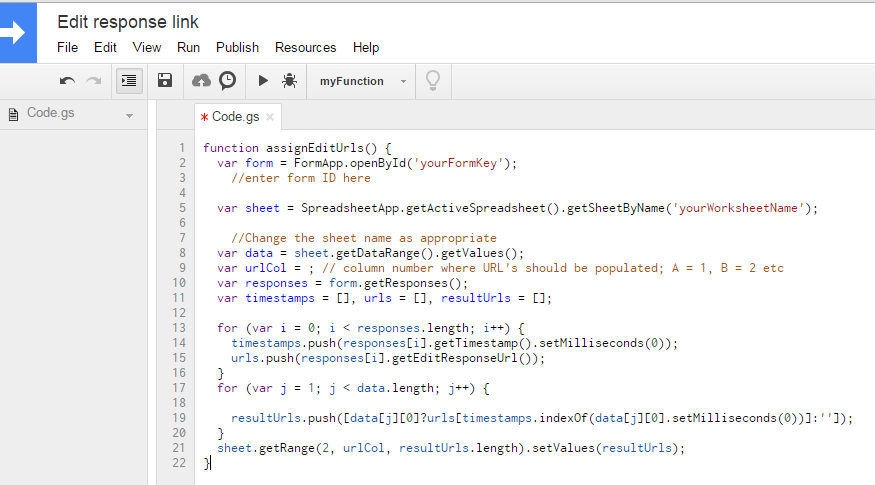
Google Apps Script editor

About Google Apps Scripts 

Google Apps Scripts "is a JavaScript cloud scripting language that provides easy ways to automate tasks across Google products and third party services and build web applications."

With Apps Script, there's quite a lot that you can do, such as write custom functions, create macros and menus for Google Sheets. Google itself provides quite some guidance on how to work with Apps Script, but sure this may not be easy for a total beginner.

Luckily, there's plenty of kind (and clever!) people out there that have developed Apps Scripts and make them available to others online. And those you can just use!

Use Apps Scripts to collect Forms "edit response links" 

In M&E system and dashboard developed for IDRC program, as we saw part of data collection is manual, with users inputting data for research outputs and pilots through a series of Google Forms. So what if users want to update/modify an existing entry?

If you are familiar with Google Forms, you probably know that responses can be collected into a Sheet. You may also know that you can set up your Form so that, after an entry is submitted, it sends an email to the person that has contributed that submission. The email contains a link that the person can click to in order to modify/edit the entry.
Well this is sure nice and useful!

But wouldn't it be better if the edit response links were also added to the Sheet where the responses are collected, nicely ordered in line with the relevant form entry?

You can do this, with this Google Apps Script I've found browsing online.

To use this Apps Script, what you have to do is the following:
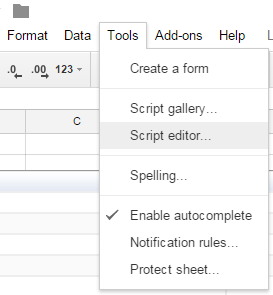
  • Click on Tools >> Script Editor in your destination Sheet (as in the image on the right);
  • In the Script Editor, copy this piece of code here
  • Change the parameters as indicated in the code; 
  • Save the script and run it; 
  • Click on Resources >> Current projects trigger and set the script to trigger at every new Form entry; 
  • Check that the edit response links are added in the right column on the destination Sheet.
Done! You set it up once and the script will continue to run and collect edit response links every time new responses are added via the form.

Importing data from a different spreadsheet using scripts

While this Apps Script is very specific for when you use Forms, there are few others that can come in handy in more occasion. For example, to automatically copy (part of) data from one Sheet into another one.

While you can actually do also this using in-line cells functions, as nicely explained in this post, I've found this to be not very reliable and not to always update automatically. So I would recommend to take the slightly more technical route and use Apps Scripts. You can find the link to the code and the explanation on how to insert this script.

Give it a try and see for yourself how it works. And let me know in the comments here if you are using other useful Apps Scripts that’s worth sharing.
Thursday, February 12, 2015

Collaboration for teams and projects using Google Apps

Online collaboration is a fact of life in International Development programmes. Teams and individuals are scattered across organizations, across countries and regions, as well as time zones. Sadly, we hear more grumbling about platforms and processes than success stories. So working with organisations to improve how they work together online takes up a lot of our time.

The problems vary with the size of organisation, to some extent. Large organizations normally have Intranets or private networks, but these aren’t always open to project partners from other organisations. But their rich features often make them difficult to access from international locations, especially where Internet access is still expensive and/or unreliable. However, there is also a downside to the use of free tools, which we at Euforic Services have often promoted. That option normally means using several different platforms, like wikis, blogs, project management systems, etc., that need to be brought together somehow and may require multiple sign in and entry points for users.

So sometimes it’s worth investing a little in developing an integrated platform. But money is always an issue, so how easy is it to customise a collaboration platform on a tight budget?

We had the chance to learn and experiment last year. With our friends Antonella Pastore and Tania Jordan, we were contracted by IDRC to configure and deploy an online platform that would support knowledge management and communication in a new collaborative research programme.
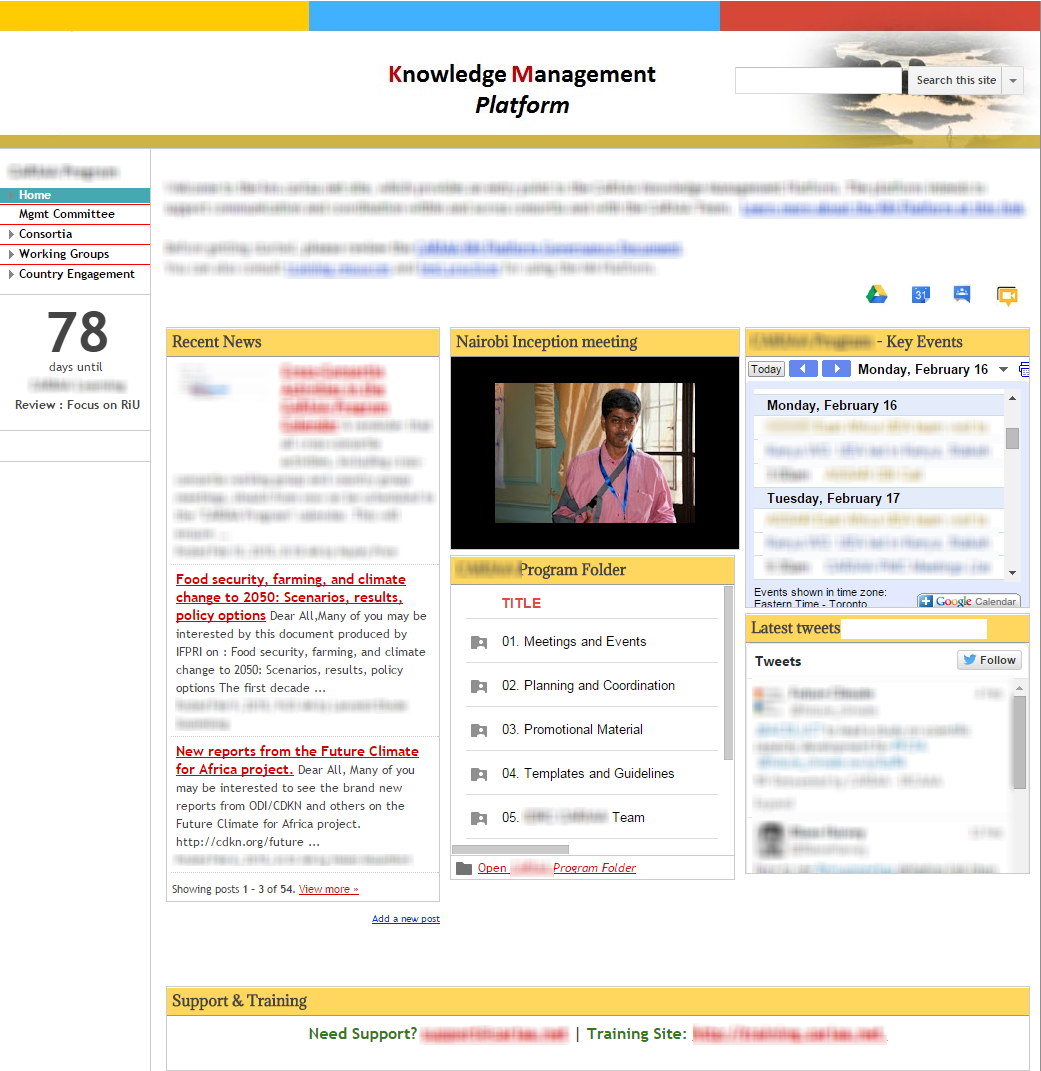
Homepage of the KM platform

The platform was to be based on the Google Apps infrastructure, previously selected by IDRC during an earlier phase of the project.

In Euforic Services we’ve been using Google Apps for several years now in our own work and for external projects and consultancies, in relatively small teams. But this was a new challenge, how to deliver a fully fledged collaboration platform and get over 200 people on board? So what does it take to configure and deploy a platform that is functional and it is actually used by teams and individual users? And what did we learn in the process?

Our project plan and implementation followed a rather standard approach and sequence - from configuration and set up to pilot phase and iteration, to soft launch and go live. But for each of these phases there are some specific elements that is important to consider for a successful deployment of the Google Apps - as well as for any other online collaboration solution.

Decide what is in and what is out - and think 'around' the box

From the initial scope of the work and during the inception phase, we agreed with the IDRC team on which Google Apps would form the core of the collaboration platform. These included: Sites, Drive, Calendar, Google+ and Hangout, Picasa Web Albums.

If you are familiar with Google Apps, you may have noticed that Gmail was not included in the configuration of the platform. Indeed, each of the potential end users already had an institutional mailbox and the idea of having to manage a secondary email address was not negotiable.

So how to get around it, when Gmail is central for the Google Apps? The solution we found was to set up the new user account with an automatic forward so that all emails sent to their new Gmail address would be automatically sent to their primary email box. As a consequence, we also created a Site as central entry point for the whole platform (see image above) and worked with Google Groups to define and manage the sharing and access rights to documents on Google Drive.


Walk the talk - use the tools to support project management 

From the very start of the project, during the inception phase, we used the exact set of tools that had to be deployed in the new platform. While this was business as usual for us (the combination of Google Docs, Calendar, Hangout etc is our standard modus operandi), this also allowed the project team at IDRC to improve their own skills and knowledge of the tools in a learning by doing approach. As a result, not only they learned the ins and out of the Apps but could later act as super-users and platform champions.


Make it real - pilot and soft launching 

When defining the pilot, we wanted users to go through a set of test cases. These were documented in a step by step pilot guide, developed using a combination of Google Sites and Docs. As the pilot users were all from the same working group, we defined the pilot using real content and for a real purpose: finalizing the organization of a working group meeting. Working with this real live case and with real content was instrumental in getting pilot users on board, as they saw the results of their participation in the pilot coming together and being used in the actual face-to-face meeting.
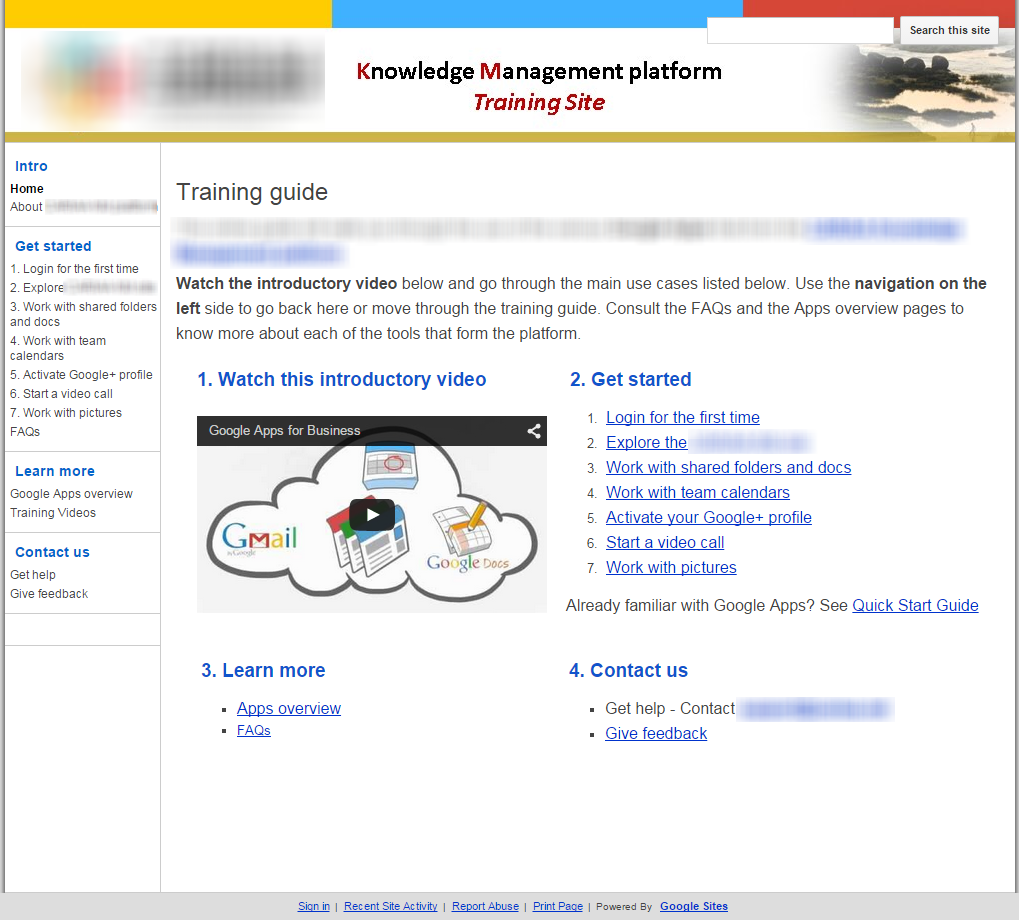
KM Platform training guide


Get your users on board - training, demos, helpdesk 

As we opted for a managed rolled-out in the deployment of the platform, we were able to consolidate the training and support documentation, as well as the platform navigation, with the feedback received by the first pilot users. At the opening of the platform to a larger number of users (around 100), we run two online demos sessions (using Hangouts - again, learning by doing) which were also recorded for later playback. Additional webinar sessions were planned after the third round of accounts creation. A helpdesk was (and still is) also in place for troubleshooting and additional users’ support, with guaranteed response time within 24 hours.


Give users solutions - not tools 

With a lot of focus on the tools and technical solutions that are available out there, we should not forget that what is actually needed by users are effective (and possible simple) solutions that can enable their work. For example, working in geographically dispersed teams, one primary need of platform users was to held online meetings - so Hangouts is the solution. Adopting a functional perspective (instead of a tool focused perspective) helps users to understand how to work more efficiently and effectively - and to buy in into a new online platform.

With a new batch of users accounts created recently, the platform has now over 200 active users. While it’s still too soon to evaluate users’ engagement and activity, the usage statistics look promising so far. However it’s clear that the success of the platform will now depend on getting most of the users to work along - or at least get a large enough critical mass of users doing it.