Google+
Showing posts with label twitter. Show all posts

Monday, October 19, 2015

Four useful tools to monitor Twitter use and engagement

If you search on Google for “Twitter monitoring tools” you’ll probably get a lot of blog posts and resources with links to tools such SocialBro, Crowdbooster, TwitterCounter and many more. And of course don’t forget Twitter Analytics itself, available to all users for a little over one year now, that allows you to track engagement on your timeline activity and followers growth.

However, for most popular uses there are limitation in terms of free use and you’ll have to purchase a subscription to use all their features. And Twitter Analytics doesn’t give you all you may need in terms of tracking Twitter use and engagement. For example, you may need to track activity around a specific hashtag or Twitter account, around an event or an online campaign. Or to analyze the Twitter users in a specific list. Or to monitor the number of followers and growth of several accounts, some of which are created and managed by others.

For several of the projects I’ve been working on in recent months, I had to spend some time looking at possible solutions to these needs. After some researching, testing and experimenting, here are four useful tools that you can use to enrich your digital analytics around Twitter.

Keeping track of Twitter followers numbers 

Example dynamic followers count 
 While number of followers to a Twitter account may not be by itself very meaningful as a metric to track users’ engagement, it is still a quick, useful indicator of your ability to connect and expand your audience. Tracking Twitter followers numbers is easy when you have to look at the followers of just one Twitter account. But what if you need to monitor and aggregate the followers of several Twitter accounts, how can you easily do it?

After some searching and (several) failed tests with different solutions, I finally came across this excellent Google Script created by Sarah Marshall. After you setup and configure the Script, you’ll be able to automatically add Twitter followers numbers to a Google Spreadsheet, for as many Twitter account as you need.

This is a great tool to have a quick overview of the followers of different Twitter account at a glance. Moreover, Sarah has kept updating the Script, whenever Twitter has changed the way its API works.

Exporting Twitter lists 

TwExList is an excellent service to export a wide range of information from Twitter. For example, you can export information such as followers and following, tweets, mentions and favourites of your own Twitter account or of another user account. Likewise, you can export information around a Twitter list, regardless of whether you have created the list or not.

Example TwExList Excel export - click to enlarge the image

Very simple to use, in four easy steps TwExList offers you different options - from Excel and CSV to html - to export the data you’re interested.

Given the many different types of information that you can export using TwExList, there are many, many ways in which this tool can come in handy. For example, you can analyze your Twitter timeline posts, to see which one created more engagement (retweets and favorites); or you can inspect your followers - or the members of a list - to see influencers and active users . Finally, you can use this service to keep an eye on your ‘competitors’ and see how they are using Twitter, the kind of following they have and how they create and sustain engagement.

The service is free to test, limiting the export to the last 50 tweets in a list. Different pricing options are available from single to unlimited exports.

Monitoring Twitter engagement 

Two very useful tools you can use to measure engagement and track conversations on Twitter are Zapier and TAGS.

Zapier connects web services and apps to automate ‘actions’ between them on the basis of defined triggers. For example you can use Zapier to connect Twitter and Google Drive so that each new engagement action (mention, RT or reply) around a Twitter handle or around a hashtag is recorded and added as a new row in the connected spreadsheet. Amongst others, information that can be recorded includes: post link; user name and location, RT counts, etc...Pricing plans for Zapier start with a free account, for 3 Zaps and up to 100 records/month. Paid accounts start at $15/month for 10 Zaps and 3000 records/month.

Use Zapier to connect Twitter and Google Sheets - click to enlarge

A great alternative is TAGS, the free service developed by Martin Hawksey. TAGS (short for Twitter Archive Google Spreadsheet) is a Spreadsheet Template that users can easily copy and configure to suit their needs to track mentions and search terms on Twitter, and automate the collection of these results.

One of the things I love about this service is that, together with a worksheet collecting the various tweets, the spreadsheet template comes with a summary and dashboard sheet already built in, so you don’t have to worry about setting this up but can start focusing on the analysis of your results immediately.

Example of TAGS dashboard
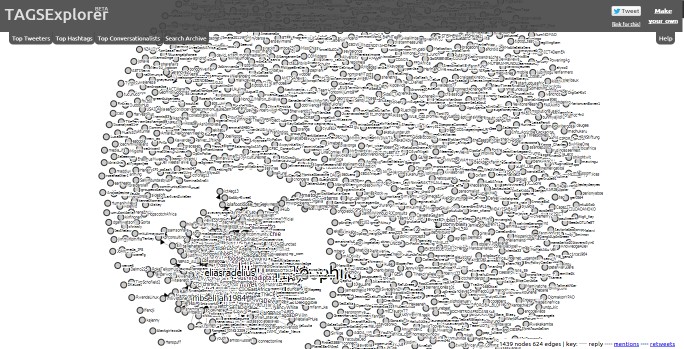
Additionally, TAGS comes with two nice add-ons: a searchable, online archive of the tweets collected and an explorer to visualize the engagement and connections between different users.

Example of TAGS searchable archive - click for live version
While I’ve started using TAGS as part of the toolkit to monitor online engagement for social reporting around events, increasingly I’m recommending it as a good solution for ongoing monitoring and evaluation of a specific Twitter handle, or a particular hashtag or search term.

What other tools do you use to support and complement your Twitter Analytics?

Monday, December 02, 2013

Do more with your tweets - Social reporting at ICT4Ag

In my previous post about tracking the online buzz generated around the ICT4Ag conference I’ve mentioned a couple of the tools that we used in the social reporting of the event. At the ICT4Ag conference, blogs, workspaces, Twitter and the other ‘usual suspects’ formed the backbone of our technology infrastructure.

However, besides these tested and tried solutions, this time around I wanted to experiment with some new applications around the edges of the process.

In this and the following posts I’m going to zoom in and focus on technology, presenting some new (to me at least) applications that I’ve used and what I’ve learnt - and what I would do different next time to further develop my own practice.

Specifically, this post looks at different tools to do (much) more with Twitter.

Conference structure, KM and Twitter #tags

The conference programme was organized around 3 main conference streams, a Plug and Play day and a Hackathon running in parallel to the main event. While it was a no brainer to decide the conference tag and the tags for Plug and Play and Hackathon, the design of the conference in streams and sessions presented some challenges in terms of effective use of #tags in Twitter.

On the one hand, we were expecting (as it indeed happened) quite some buzz on Twitter - and we needed to have ways to aggregate and disaggregate tweets around different conversations. On the other hand, CTA KM team was also interested in finding ways to archive and search the different tweets - around the conference #tag and specifically according to the different conference streams. Finally, we wanted to have the possibility to display specific twitter feeds on each tabs of our social dashboard.

So once we had decided a basic #tag vocabulary, with specific #tags for each session, I was faced with the challenge to find ways to:
  • Extract information from Twitter a Search - possibly a feed search results for each session #tag; 
  • Aggregate this info to display twitter feeds around each of the three conference streams; 
  • Find a way to archive and search these Tweets.

Display and aggregate Twitter search RSS feeds

This sounded complicated to achieve when I first looked at it. With the recent changes in Twitter API policy, users are no longer able to obtain any of the Twitter streams – search results, timelines of users, users’ favorites etc – in an RSS feed.

After spending some time researching and testing online what tools I could use to get a Twitter RSS feed, I found that some smart folks out there had the answer I was looking for and I was able to use some simple Google Scripts to set up a Twitter RSS feed for each session #tag search result.

Once I had created these 25 odd Twitter search feeds (one for each session #tag), I was then able to aggregate them into consolidated feeds for each of the 3 conference streams, using Yahoo Pipes. So for example, out of the Twitter search feeds for each of the 12 sessions in the Emerging Innovation stream, I was able to produce a single, aggregated Twitter feed.

Never miss a Tweet!

Once I’d solved this challenge, I was still presented with the need to find ways to archive tweets - as after a while they disappear from the search results. Plus, this Twitter archive had to be searchable, to meet the needs of the CTA team to browse and use this content in the future.

The solution here came from a brilliant post by Martin Hawksey, where he presents TAGS5.0 - a way to archive AND visualize tweets, automatically pulling results from a Twitter Search into a Google Spreadsheet.

This was indeed a great discovery and using it has proved to be of great interest and value. 

The full Twitter archive for the conference hashtag #ict4ag13 is available as a public Spreadsheet on Google Drive. You can also explore the interactive visualization of the conversations on Twitter, mapping replies, retweets and mentions, and the relations between different users. Finally, it gives you a complete Twitter archive that can be easily browsed and searched by keyword or by username.

Together with one main Spreadsheet for the conference hashtag, I’ve also repeated the process and created different Spreadsheets for:
For each of them, you can visualize the interaction and search the online archive of tweets (see on Summary tab, then Public web views).

Back up if you can

While the whole setup was quite easy, I did encounter one main technical problem. The script failed to archive several tweets for two days of the conference - maybe due to the very high volume of tweets that were generated.

Luckily I had also set up a backup for the #tag search in Hootsuite and I was the able to reconstruct the full database in the days after the event. But of course this is not ideal, as it require quite some time in moving data from one spreadsheet to the other.

Despite this, the end result is quite useful I believe, especially as it enables the preservation of the tweets for future reference and research, and to compare different events in terms of online conversation and engagement on Twitter.

I’d also like to see if the visualization of the Twitter conversation can be improved and provide a clear picture of the connections.

Any expert out there that would like to give it a try and improve the visualizations from the complete dataset?

 - 

Thursday, November 28, 2013

Tracking reach, understanding engagement - Social reporting at ICT4Ag

Over the past few weeks, I’ve been busy with the preparation and the coordination of the social reporting team for the ICT4Ag conference in Kigali. I'll blog separately about the process and learnings (actually, a lot!) in terms of both technology and people for a successful social reporting effort.

But if you are interested in discussing Twitter reach and online engagement around the event, please stay with me for a few minutes and keep reading.

The starting point for this conversation is the post that my friend and colleague Pete Cranston published few days back. I’m grateful for the questions he poses, as they couldn't provide a better framework for my reflection.

It’s two million, actually...

On one thing Pete is not not correct though. According to Keyhole, the tool we used to track the conversations around the conference hashtag #ict4ag13 (on Twitter, Facebook and Instagram) the total reach is over 2 million!

Together with the reach (defined as "the number of unique followers that a users has - and so the unique number of people that a tweet could potentially get to"), Keyhole also tracks impressions, number of posts and number of users that have contributed content around #ict4ag13. So if we look at this full picture, the headline figures are even more impressive, with over 12 million impressions, from 11,900 posts contributed by 1,272 users.

(click to enlarge image)
#ict4ag13 real-time tracker with Keyhole - 12 Oct-11 Nov. 2013
So what does it mean to reach these people? And do these numbers really matter?

On the one hand, if I look only at these figures, I am very pleased with the results - and I am indeed including these figures in my report back to CTA! And not just because I believe in ‘vanity metrics’ (in fact I don’t, as you’ll read) but for the reason that these numbers could be enough for me to say that the objective of the social reporting project - in terms of raising online awareness on the topics/sessions of the conference, update the online audience on the conference proceedings and engage them in the discussion - were met.

But I want to move beyond the numbers or - as Pete put it - "avoid the risk posed by pure, refined white sugar."

Keyhole itself provides some useful indicators that go in this direction. Indeed, it gives you insights on the contents that are shared (at the level of domains and individual links). It also provides a useful map that show where the conversation around the hashtag are happening, the demographics of contributors and the share of posts between original posts, retweets and replies.

To me these are already very interesting analytics and they provide a much richer picture of the online conversation around an event - and how users engage with it.

However, if you want to understand more about the value of social media for events and where different users position themselves on the ladder of engagement, especially when we look at Twitter conversations, I think different approaches are needed.

Tracking engagement, mapping conversations

While preparing for the event, I spent quite some time researching online for tools that could allow me to archive all the tweets around #ict4ag13, and to do some more analysis beyond the usual suspect metrics. I was looking for a free tool, and after several searches - and testing some applications - the right query string finally landed me to this post by Martin Hawksey, where he presents a way to archive AND visualize tweets, automatically pulling results from a Twitter Search into a Google Spreadsheet.

I am not going into the technical details of how this works (Martin does a pretty good job himself in explaining how to setup and use this script). As for the technical problems I have encountered, this will be in follow-up posts.

Again, I’d like to focus here on the results, and show you how different the picture looks like if you add another layer of analysis to the data available.

(click to enlarge image)


(Note - An interactive version of this visualization is available online but sometimes it may take long to load. You can hover over a node to see a summary of the data recorded in the archive. By clicking on the node you can see the conversations that person had condensed into 30 seconds)

As you can see in the image above, this visualizations shows the conversations between Twitter users around #ict4ag13 - producing a network analysis where the different nodes represent users and the connections between them is determined by the replies and conversations between them - instead of just retweets.

While this is probably not perfect - the visualization for example could be improved to have a more clear picture - I think this is very useful to evaluate the conversation around Twitter. In the case of the ICT4Ag conference, while many users contributed content, not all of them had been engaging in conversations - rather this happens amongst a core, central group of users, while many more remain at the periphery, broadcasting, engaging with the content of the conference but not really exchanging with one another.

Show off but connect the dots!

So while I am definitely using some ‘vanity metrics’ in my report back to CTA I think that a fair assessment of social media engagement around an event like in the case of ICT4Ag needs to look beyond just these numbers. It needs to map the conversations and the contents that are shared. Most important, once you have these information, it is critical to act on it and spend more attention into enlarging the conversation, to making sure that each contributor does not talk to himself but engage with others - or to put it another way, that each dot has at least a line that connects to it.

 - 

Friday, May 18, 2012

We’re all Digital Migrants now

‘Social media for sceptics’ could have been a subtitle for the coaching programme we have been running with Diplo staff and teaching faculty. Distinguished and deeply experienced diplomats and educators were presented over the four weeks with an introduction to personal dashboards like iGoogle or Netvibes, tools to help select from and manage the racing ‘web of flows’; they engaged with enthusiastic bloggers; and we shared experiences of using LinkedIn and Twitter.

If there was an icon for many of the exchanges it would be a pair of folded arms, below a head leaning back, with a raised eyebrow, perhaps saying, “Really?” Entirely understandably and properly, those experienced in the subtlety, complexity and richness of diplomatic communication wanted evidence not hype, to interrogate the real and potential contribution of social media. These tools are increasingly part of the mainstream in Public Diplomacy, illustrated in the slowly growing activity on #eDiplomacy and #DigitalDiplomacy on Twitter and the professional social media operations of many larger MFAs, like the social-media rich US State Department  site or the open promotion of UK FCO Digital Diplomacy. In their public engagement on the platforms diplomatic communicators have to adapt their language and engage with the predominant culture, much as people do on postings outside their own country. Will this in turn impact the language and practice of Diplomacy? There is plenty of case-lore about the overflow from social media into more private spaces of negotiation, as Governments and individuals use public social media to promote their causes, test opinion, leak to embarrass or wrong-foot. Will open media, digitally literate populations and universal access to the Internet transform Diplomacy? We might also need an icon for a sceptical snort.


None of the participants on our coaching programme had grown up with social media, or any of the web2.0 toolsets, indeed some of us were around before electronic computers. But our current usage of the tools bore no relationship to our age. The experience cemented for me my changed position on the concept of Digital migrants. This is based on the notion that Digital natives, people like my 27 year old son, who grew up with computers and digital tools as an integral part of their environment, have an affinity with the technology and its use which is denied those of us who have migrated into the culture. David Hockney, the modern British artist, provides a compelling illustration of how adoption of technology and its functions is far more to do with experience and engagement than upbringing.  For those who don’t know his work, he is extraordinarily prolific, and popular –'worth a staggering £80 million'. Hockney integrated video into his work as soon as it became a consumer commodity and has used the iPad as a sketch pad since it appeared. He has always sketched quickly, and often produces several paintings in a day. But the iPad has extended his range. As a consummate artist he does more than sketch: he draws on the iPad to scale, with the size of the final blown-up product in his mind, as it might appear on a gallery wall, as illustrated opposite. In the jargon, he has appropriated the technology – not only learnt how to use it but innovated with it and developed a new form. Hockney is 74. 

There are still digital divides: recent Pew research showed 20% of US adults don’t use the Internet at all. But their findings confirm those of the earliest Oxford Internet Institute UK Internet survey which demonstrated that the strongest indicators of Internet activity were the same forces that have always influenced social exclusion, namely education level and wealth. And soon to be published research from the UK Institute of Development studies, into the ‘information ecosystem’ of ‘policy actors’ in six Southern countries confirmed what many of us have been arguing for years, from our own experience: that the ‘elites’ in economically poorer countries, once they have access to affordable technologies like the Ideos smartphone, retailing for  $80 in Kenya, access information and engage with friends and colleagues using digital tools - and their profile of tablet use is ahead of many wealthier countries.

Pew illustrates that not being aware of the benefits available on the Internet is also a factor in not being connected. But people who engage with digital culture later in their lives do have to overcome barriers to do with confidence in a particular way. People who grow up using technology are obviously more comfortable using it and, importantly, often find migrating to newer technologies – software, devices – relatively easy. They have expectations about how these things will work: they assume, for example, that there will be menus and a logic to functions; above all they know it will work, you only have to learn how. They are unafraid.

Then again, the impact of openness and the giving away of data to the new behemoths of the Internet age, Facebook and Google, is something that had to be learned by eager 20 somethings, while many older people were instinctively suspicious and more cautious. (even though the former might have taught the latter where to find the security settings). But on the day that eight year old Facebook has been valued at an unimaginable $104 billion why not sit back and listen to the master talking about his instant iPad art.

(cross posted from Diplo Foundation site)

Thursday, February 23, 2012

e-Diplomacy: The complexity of influence

'Twitter Diplomacy', an article by US NPR (National Public Radio) sparked a flurry of interest on Twitter itself. The original article posed both sides of the case for 'Statecraft 2.0'. It highlighted the view of John Brown, from Georgetown University, that "what's most important about public diplomacy..  is not Facebook to Facebook, but face to face".

However,  the article also talked at length about  blogging ambassadors such as Robert Ford, the U.S. ambassador to Syria, who is using Facebook intensively even while he is out of the country, for example posting satellite images of tanks moving on cities in Syria, and ambassador, Michael McFaul in Russia, 'who is using social media to counter what's being said about  him in the Russian press'.

Influencing people, their perceptions and their behaviour is the target for all those investing huge resources into social media. Careers, and possibly fortunes, are being carved out in the wake of our mass migration online by pundits and experts mapping our social footprint  and telling us how to increase the potency of our media profile.

Facebook rescues the Euro

Unsurprisingly, platforms like Facebook are keen to encourage us to spend even more, in our own interest. Facebook commissioned research from Deloitte -  'Facebook's economic impact on Europe' which claimed that for Europe as a whole, the economic impact of Facebook was an estimated  €15bn in revenues, supporting 229,000 jobs. The report was published a day ahead of the annoucement by the European commission of plans for a "comprehensive review" of the EU's 1995 data protection rules "to strengthen online privacy rights" and "boost Europe's digital economy". John Naughton was among many who smelt a rat in the timing, and scorned the disclaimers from Deloitte that they couldn't be held accountable for its accuracy.

Complexity and influence

Ben Ramalingam, a visitng fellow at  the UK Overseas Development Institute, does a more thorough debunking of the report and locates his analysis in a wider critique of claims by social media giants to enormous influence. Ramalingam researches and writes on the implications of complexity science for  climate change and international development. He quotes approvingly from - and summarises - a piercing analysis by  Philip Sheldrake in the Guardian newspaper, illustrating how the ideas and tools of complexity science are abused to lend an air of credibility to claims of social media impact. While not at all denying the power and influence of social media he urges reason and caution:

"Overall, it seems that each of us is more influenced by the 150-odd nearest to us than by the other six or so billion combined. Influence is truly complex. And this is a considerable challenge – and opportunity – to marketing and public relations firms. So far, many have claimed to be able to identify the influentials, get to know them, and influence them. They are effectively claiming to be the influencer of influencers, a sort of influencer-in-chief if you like".

And he urges us to " avoid such simplistic thinking, such hyperbole, and recognise complexity and navigate it appropriately". Diplomats need no introduction to complexity. Perhaps their increasingly wholesale adoption of social media will provide a better opportunity to explore cautiously the subtle interaction of communication and influence.


(Cross-posted from the Diplomacy Foundation website blog. We support Diplo in communication)

Monday, November 14, 2011

Social media for outreach and engagement. The e-Agriculture platform

During the KM4Dev meeting held at IFAD in Rome last September, we had the chance to sit with FAO Michael Riggs for an interesting conversation on social media, and what benefits it brings to the e-Agriculture platform.


e-Agriculture is "a global Community of Practice, where people from all over the world exchange information, ideas, and resources related to the use of information and communication technologies (ICT) for sustainable agriculture and rural development." In this sense, e-Agriculture is essentially a web platform where users can register a profile, or simply browse content without loggin in onto the site.
Michael explains which social media channels they are using and what strategy and purpose each of them respond to. Michael also reflects on the issue of social media engagement and define what this means for the e-Agriculture platform. Further, he touches upon the resources they are investing in these efforts. He concludes with three top tips for effective use of social media:
  1. Make it look human - There needs to be a person behind the accounts and you cannot just feed the different channles in fully automated ways.
  2. Reach out to different communities -  Using multiple platforms allows to create awareness of what your are doing to users beyond your website visitors; it also allows to reach different demographics.
  3. Be strategic - It is good to 'play around' with social media tools but eventually you have to strategically look at how they fit into your toolbox, and what they can help you achieve. Specific implementation depends on your context and your objectives.